Control Pi-hole 6 using Apple Shortcuts
This is the same post as “Disable/enable Pi-hole using Apple Shortcuts” that I published a few years back, but aligned with the 6th major release of Pi-hole. This little piece of software has been running at our place on a Raspberry Pi left and forgotten behind the cupboard for years. It filters the nonsense that the internet is full of and protects our privacy by killing all the trackers at the DNS level. Browsing the internet without it feels really shit now!
Occasionally it causes some disruptions, so it is handy to have a method to switch it on and off in a jiffy, without logging into the Web UI or doing some CLI stuff. I found Apple Shortcuts to be the way. And here is the recipe for the shortcuts I use.
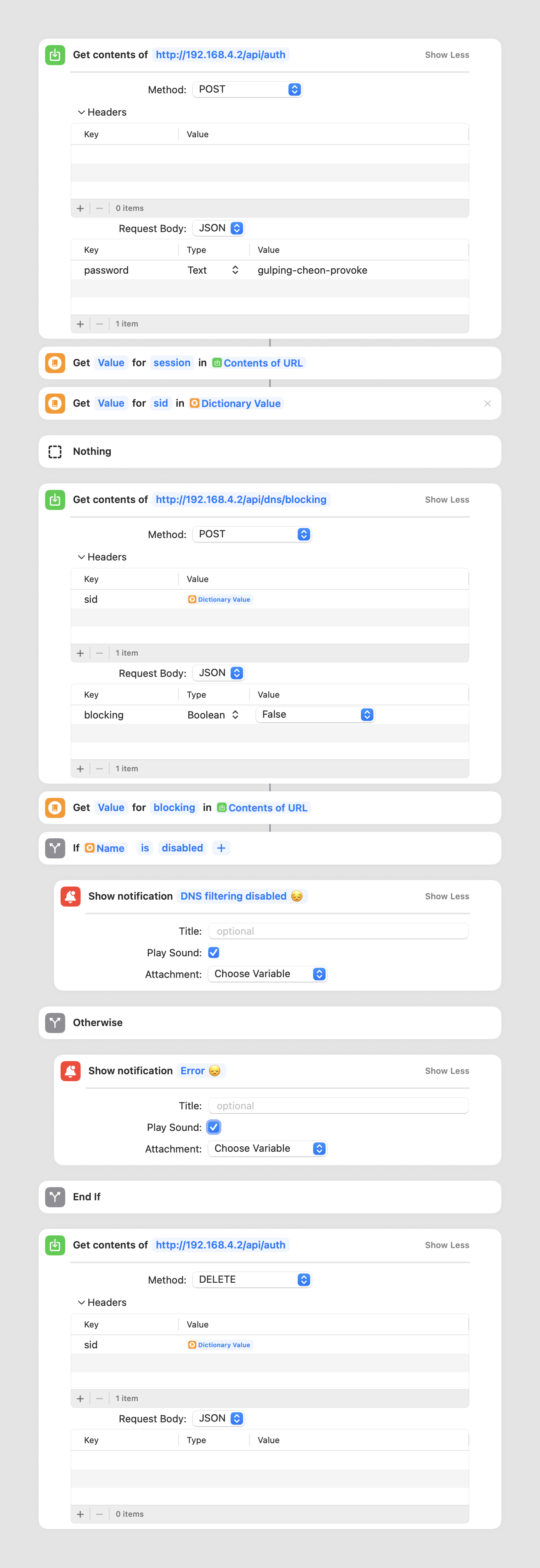
- Make a
POSTcall to/api/authto get thesid(session ID). As a body send your password. My password manager generatedgulping-cheon-provokefor me. Nice, right? - Make a
POSTcall toapi/dns/blockingwith the{ "blocking": false }body to stop the blocking. This endpoint requires an authentication, so attach thesidobtained in the first step as a header. Reverse the boolean value of the body to construct the shortcut that enables the blocking. Add a notification for successful confirmation (optional). - Make a
DELETEcall toapi/authto terminate the session. This one is an easy one to forget but important. The number of sessions is limited by thewebserver.api.max_sessions, so it is a good practice to close the session when the task is over.
For clarity, curl equivalents below.
curl --request POST \
  --url http://192.168.4.2/api/auth \
  --header 'Content-Type: application/json' \
  --data '{
	"password": "gulping-cheon-provoke"
}'
curl --request POST \
  --url http://192.168.4.2/api/dns/blocking \
  --header 'Content-Type: application/json' \
  --header 'sid: XXXXXXXXXXXXXXXXXXXXXXX' \
  --data '{
	"blocking": false,
}'
curl --request DELETE \
  --url http://192.168.4.2/api/auth
  --header 'sid: XXXXXXXXXXXXXXXXXXXXXXX'
No link to shortcut?
Hey me. Nice name. No link for two reasons. I hardcoded some values that are not relevant to others, like the local IP and password, and I have no clue how to parameterise that stuff. Second reason, I have given you a detailed few steps recipe and if you really need it, you can replicate it on your own in 37 seconds. Have a fab day me 👋
This is awesome thanks!
You can also spec a timer to auto reset!
{blocking: false, timer: 60}